


A register is a record, not the system. Most tools in this category digitise the list. An enterprise needs to know what each risk connects to: the objective it threatens, the controls holding it, and the evidence that those controls work.
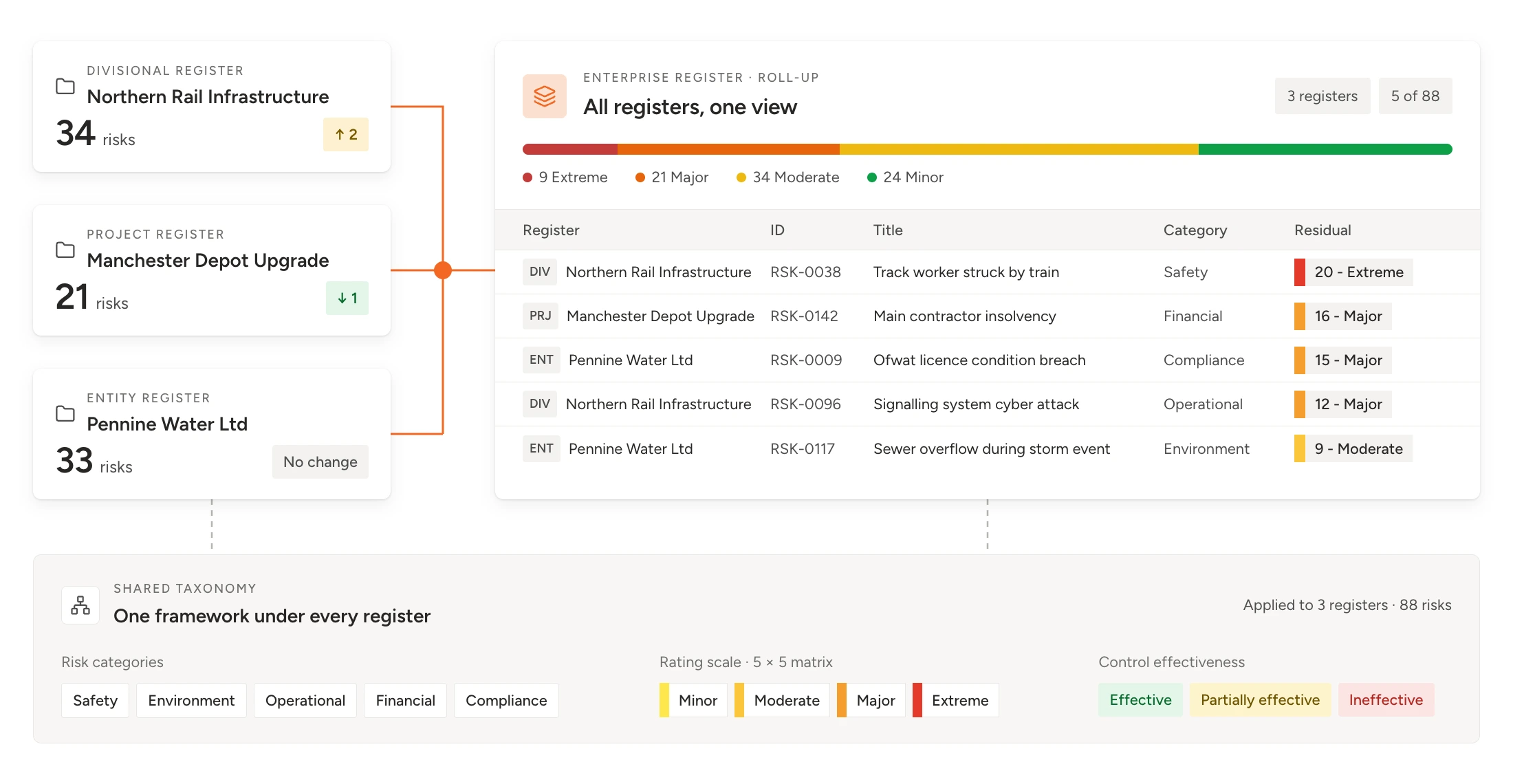
Run as many registers as your structure needs, with one view. Divisions, projects and entities need their own registers. They also need one shared taxonomy, and a roll-up that links records rather than copying them.
Test the chain in the demo, not the feature list. Give vendors your structure and a real scenario. Then watch whether a change in one register shows up everywhere it should.
The week before audit committee is when you find out what your risk register software is really for.
The head of risk has eleven divisional registers open. Three of them describe the same supplier failure. One rates it high. One rates it moderate. The third calls it vendor risk, files it under operations and has not reviewed it since spring. Reconciling them will take two days, and the board report that comes out the other end will describe last month, not this one.
Nobody has done anything wrong. Each register was built in good faith by people who know their part of the business. The problem is not the registers. It is that nothing connects them.
Most risk register software is built to store a list well. Enterprises need something else: a register that knows which objective each risk threatens, which controls are holding it, and whether those controls work. This guide sets out what that looks like in practice, how to run several registers without losing the enterprise view, and the tests that expose the difference before you buy.
What is risk register software?
Risk register software is a system for recording, assessing and tracking an organisation’s risks in one place, with each risk given an owner, a rating, controls and actions. Unlike a spreadsheet, it controls who can change what, keeps a history of every change, and updates reports as the underlying records move. Enterprise risk register software goes further, linking risks across divisions, projects and entities to the objectives they threaten.
Risk register, risk registry and risk log all describe the same thing. The long-standing ISO definition, set out in ISO Guide 73 and since superseded by ISO 31073:2022, describes a risk register as a record of information about identified risks. That definition is the floor, not the ceiling. A record tells you what was written down. It does not tell you whether anything is being done about it.
Search for this category and most of what you find is built for someone else’s job: security teams tracking risks against a control framework, or project teams tracking risks against a schedule. Both are legitimate. Neither is the job of an organisation running risk across divisions, sites, projects and legal entities, and reporting it to a board that wants one answer.
Types of risk register software
There are five broad types of register tool on the market. Most organisations already run two or three of them. The real question is which one holds the enterprise view.
| Type | First line | Second line | Third line or external |
|---|---|---|---|
| Spreadsheets and shared lists | One team starting out | A single register with a handful of owners | No audit trail, no linked controls, and roll-up by hand |
| Project tools with a risk log | Project and programme teams | Risks tied to a schedule, tasks and milestones | The register closes with the project, and there is no enterprise view |
| Cyber and compliance tools | Security and compliance teams | Risks mapped to control frameworks and audit evidence | Strategic, operational and project risk sit outside the model |
| Safety and EHS platforms | Health, safety and environment teams | Hazard registers, inspections and incidents | Strategic and commercial risks live somewhere else |
| Enterprise risk and assurance platforms | Risk functions reporting to a board | Many registers linked to objectives, controls and assurance | More set-up, and an agreed taxonomy before go-live |
Each type does its own job well. The trouble starts when an organisation stretches a project tool or a compliance tool into the enterprise register, because neither was built to link risks across a whole structure to the objectives they threaten.
Risk register tool vs enterprise risk register software
The difference is not the number of features. It is the question the register is built to answer.
| Risk register tool | Enterprise risk register software | |
|---|---|---|
| Built to answer | What risks do we have? | Which objectives are exposed, and are the controls holding? |
| Structure | One list, or several lists that do not talk to each other | Many registers on one shared taxonomy, rating scale and appetite |
| Controls | A text field describing the mitigation | Records in their own right, linked to every risk they support and tested for effectiveness |
| Ownership | A name in a column | Named owners for risks, controls and actions, with reminders and escalation |
| Roll-up | Copied into a master sheet by hand | Linked records that aggregate without duplication |
| Reporting | Exported, then assembled | Generated from live records at every level, from site to board |
| Best for | A single team, project or compliance programme | Organisations with divisions, projects, entities and a board to inform |
Key distinction
A risk register tool tells you which risks exist. An enterprise register tells you what they threaten, and whether anything is holding them.
If one team manages one list, a simple tool may be all you need. If you have ever spent days consolidating registers before a board meeting, you have outgrown it. For many organisations that moment arrives while the registers still live in spreadsheets, which is a decision with its own warning signs. Our guide to moving your risk register from Excel to risk management software covers when to make that move.
Risk register software features: the baseline checklist
Before you test anything, check the basics. Any tool worth a demo should cover all of these.
- A central register with configurable fields, categories and risk types.
- Your own likelihood and impact scales, rating matrix and heat map.
- Inherent and residual ratings, so you can see what the controls are doing.
- Named risk owners, with review dates and automatic reminders.
- Controls and treatment actions recorded against each risk.
- Key risk indicators with thresholds that flag movement early.
- An audit trail showing who changed what, and when.
- Role-based access, so people see and edit only what they should.
- Bulk import from spreadsheets, and reports that update as the records change.
Most tools tick most of these boxes, which is why they are a baseline rather than a differentiator. The differences that matter at enterprise scale sit one level up.
What to look for in risk register software: six tests
Past the baseline, feature lists look alike from vendor to vendor. These six tests look past the list to the question that matters: does the register stay connected when your organisation changes?
1. Every risk links to an objective
A risk only matters because of what it threatens. If the software cannot link a risk to a strategic or operational objective, it cannot tell you which objectives are most exposed, and your board will keep asking. Look for objectives held as records in their own right, so one objective can carry many risks and one risk can affect several objectives.
Test it
2. Controls are records, not descriptions
In most spreadsheets, a control is a sentence in the mitigation column. In an enterprise platform, a control is a record with an owner, a test and an effectiveness rating, and one control can support many risks. That matters because controls fail. When one does, you need to know every risk it was holding.
Test it
3. Many registers share one taxonomy
Divisions, projects and entities need their own registers. They also need to speak the same language: the same risk categories, the same rating scale and the same definitions. Without that, consolidation becomes translation, and translation is where the supplier risk in the opening example got lost.
Test it
4. Ratings use your matrix and your appetite
Your organisation already has a risk matrix and, ideally, an agreed appetite. The software should adopt both rather than ask you to adopt its defaults. Appetite also needs to do work. When a residual rating moves outside tolerance, someone should be told, without anyone having to notice first. If appetite and tolerance still blur together in your organisation, settle the difference between risk appetite and risk tolerance before you configure anything.
Test it
5. Business owners can use it unaided
The risk team is a small fraction of the people who keep a register current. Control owners, action owners and division heads keep it up to date, or it goes stale. If the software needs training to update a single action, most of them will email the risk team instead, and you are back to a spreadsheet with a login.
Test it
6. Reports come from the records
A board report assembled from exports is a snapshot of the day someone made it. Reports drawn straight from the register are current when they are read, and every figure traces back to a record with an owner and a history. That traceability is what turns a report into assurance. What directors actually need to see in a board risk report is a shorter list than most registers produce.
Test it
"The register is the record. The value is in what it connects to."
One risk register or many? How to structure multiple risk registers
Most enterprises need multiple risk registers and a single enterprise view. Divisions, projects, sites and legal entities each need a register their owners can manage. The enterprise register should draw on those registers through links rather than copies, so a change at the source appears everywhere it matters. In the UK public sector and the NHS, that enterprise view is usually called the corporate risk register.
When a separate register makes sense
Give part of the organisation its own register when at least one of these is true.
- It has its own accountable leader who will review the register and act on it.
- It runs on a different cycle, such as a capital project that will close or a site that reviews hazards weekly.
- It needs different access, such as a legal entity with its own board or a programme with commercially sensitive risks.
- It carries a distinct type of risk, such as safety hazards at an operational site or delivery risk on a major project.
If none of these applies, a separate register adds administration without adding insight. A filtered view of the main register will do the job.
What every register must share
Separate registers only work if they agree on four things. Settle them before you configure anything, because changing them later means re-rating every risk in every register.
Agree these four first
One set of risk categories. One rating scale and matrix. One set of appetite thresholds. One hierarchy of objectives that every register links to.
Link risks across registers, do not copy them
The common mistake is escalation by copy and paste. A project risk grows serious enough for the enterprise register, so someone copies it across. From that moment there are two versions. The project manager updates one. The board sees the other.
Linking avoids that. In Clew, project registers sit alongside the enterprise register, and a project risk that matters at enterprise level is linked to the enterprise view rather than copied into it. The project manager still owns it. The enterprise view shows the same record, the same rating and the same actions as soon as they change. We cover the project side in more detail in our guide to connecting project and enterprise risk.
This is the clearest test of whether a platform can handle an enterprise structure, and it is what risk management software built to connect registers to objectives should do as standard.
"Copy a risk into the enterprise register and you have two versions of the truth. Link it and you have one."
Roll-up is not addition
Aggregation is where most registers mislead. Ten moderate risks in ten divisions can be one serious enterprise exposure if they share a cause. Go back to the opening example. The supplier failure rated three ways in three registers was never three moderate risks. It was one dependency carried by three parts of the business, and nobody could see it whole.
Good software lets you view exposure by objective, category and cause, not only by register, so a concentration shows up before it becomes an incident.
How to test risk register software in a demo
Vendor demos run on clean sample data, and every register looks connected on clean sample data. Bring your own structure and one real scenario instead.
Here is one that works. A transport operator runs registers for three regions and a major capital programme. One signalling supplier appears in two regional registers and in the programme register. The supplier then fails a quality audit. Ask each vendor to work through that scenario live:
- Find the supplier risk in each register, and check whether the platform recognises it as one exposure at enterprise level.
- Show which objectives the exposure threatens across the regions and the programme.
- Identify the controls that depended on the supplier, name their owners, and show what happens to the residual ratings when those controls fail.
- Raise the corrective action, assign an owner, and show how the board view changes.
If the vendor needs a consultant to answer, your team will need one after go-live. For a structured way to run the wider evaluation, use our Risk Management Software Buyer’s Guide. If you are comparing whole platforms rather than registers, see our comparison of integrated risk management software for 2026.
Common risk register mistakes to avoid
We see these in almost every register migration we support. Each one feels sensible at the time.
Migrating the spreadsheet as it is. Moving a messy register into new software gives you a faster messy register. Clean the taxonomy, merge duplicates and retire dead risks before you import anything.
Letting every division configure its own. Local flexibility feels helpful in month one. By month six you have a dozen rating scales and no enterprise view.
Treating the register as the whole system. The register is the live record. It still needs a plan that sets scope, appetite and accountability. Our explainer on the difference between a risk management plan and a risk register shows how the two fit together.
Buying for the risk team only. If business owners cannot update the register unaided, they will not, and it will be out of date by the next review.
Rating everything high. A register where every risk sits at the top tells the board nothing. Software cannot fix inflated ratings, but a shared matrix and visible appetite thresholds make them much harder to hide.
Frequently asked questions about risk register software
What is risk register software?
It is the system of record for your risks, holding each one with an owner, a rating, controls and actions, and logging every change. A spreadsheet can list risks, but it cannot control who edits what or keep reports current. Enterprise versions also link risks across divisions, projects and entities to the objectives they threaten, and generate reports directly from the records.
What is the best risk register software?
There is no single best option, because the right type depends on the job. A spreadsheet or project tool suits one team, a compliance tool suits a security programme, and an enterprise risk and assurance platform suits organisations running several registers for a board. For enterprise use, shortlist platforms that link risks to objectives, treat controls as records and roll up registers without copying, then test them with your own structure and data.
What should risk register software include?
At minimum it should include configurable fields and categories, your own rating matrix, inherent and residual ratings, named owners, controls, actions, reminders, an audit trail, role-based access and reporting. For enterprise use, add links from risks to objectives, controls that can support several risks, multiple registers on a shared taxonomy, and roll-up reporting that links records rather than copying them.
Is a risk registry the same as a risk register?
Yes. Risk register, risk registry and risk log are used interchangeably. Each describes a structured record of identified risks with their ratings, owners, controls and actions. The term varies by industry and region, but the purpose is the same.
Can I use my own risk matrix?
Yes, and you should insist on it. A risk register platform built for enterprise use lets you configure your own likelihood and impact scales, matrix size, rating labels and appetite thresholds, rather than forcing a vendor default. Test this in a demo by loading your matrix and checking that existing ratings come through unchanged.
Should an organisation have more than one risk register?
Most enterprises should. Divisions, projects, sites and legal entities often need their own registers because they have different owners, review cycles and access needs. Every register should share one taxonomy, rating scale and set of appetite thresholds, and link into a single enterprise view rather than being copied into it.
Can software replace an Excel risk register?
Yes, for most organisations that manage risk across more than one team. Dedicated software adds access control, an audit trail, automatic reminders, linked controls and live reporting, which spreadsheets cannot provide reliably. Clean the data and agree the taxonomy before migrating, so you do not import the old problems along with the risks.
How much does risk register software cost?
Cost depends on the number of users, the modules you need, configuration, data migration and support. Free options exist, mainly spreadsheets and the free tiers of project tools, and they suit a single team. Enterprise platforms are usually quoted on scope. Compare total cost over three years, including implementation and administration, and check how cost changes as more business owners take part. UK public sector buyers can also shorten procurement, as our guide to buying risk software through G-Cloud explains.
See every register in one connected view
The real test of risk register software is not whether it stores the list. It is whether it keeps every register connected to one view, so a change in one place is visible everywhere it matters.
If your registers are accurate on their own and impossible to read together, the fix is not another consolidation spreadsheet. It is a structure where every register links to the same objectives, controls and evidence.
Clew is a risk and assurance platform built around the Golden Thread: the traceable line from strategic objectives, through the risks in every register and the controls that hold them, to the evidence and actions that show whether exposure is under control. Risk and assurance teams in construction, government, healthcare, infrastructure, mining and transport use it to run divisional, project and enterprise registers as one connected view.